Wing Commander CIC
 

Hot Items

Java Chat in
#Wingnut Now!

  Standoff Episode 5
  Arena Manual PDF
  New WC Game!
  ASCII Privateer
  Flight Cmdr 1.5
  Homeworld Mod
  Standoff Scoreboard
  Prophecy Multiplayer
  WC3 Movie Project
  New Paper Models
  WC For Sony PSP
  Run Old Games
  Vista Compatibility
  Saga Prologue Out
  Prophecy DVD
  Priv 2 Cinematics
  DragonCon Gallery
  Play Armada Online
  Ten Years for WC4
  WC Turns 15
  High Res Academy
  Privateer 3 Script
  WC1 Blueprints
  Privateer Online Site
  Fan Project Roundup
  3dfx Glide Wrapper
  Saga CGI Trailer
  Trade WC CCGs
  Run WC4 DVD Easy
  Order CIC Gear
  Origin Closing Down
  Prophecy GBA

Hosting
  Black Lance HQ
  Flight Commander
  Holding the Line
  Killerwave
  Paper Commander
  Popsicle Pete
  Priv Gemini Gold
  Standoff
  Task Force 16
  Unknown Enemy
  WC Zone
  WCSOM
  More Hosted Sites

Get Hosted!

Staff
  Contact Us
  Ben Lesnick
  Christopher Reid
  Barrie Almond
  Brandon Strevell
  Kris Vanhecke
  Asher Lawson
  Aaron Dunbar
  Thanks

Links
  WC Arena
  EA Arcade
  Prophecy Advance
  Ascendant Pictures
  Destination Software
  Raylight Studios
  Peter Telep
  William R. Forstchen
  Tom Wilson
  The Fat Man
  George Oldziey


Open Your Internet Hole
There have been reports of difficulties connecting to Arena multiplayer games. The user will see a message that says unable to connect to game before being dropped back to the menu. This happens when the Xbox 360 is behind a router and the necessary ports are not being forwarded. AD found us instructions for identifying and fixing this issue. The whole process should only take a few minutes.

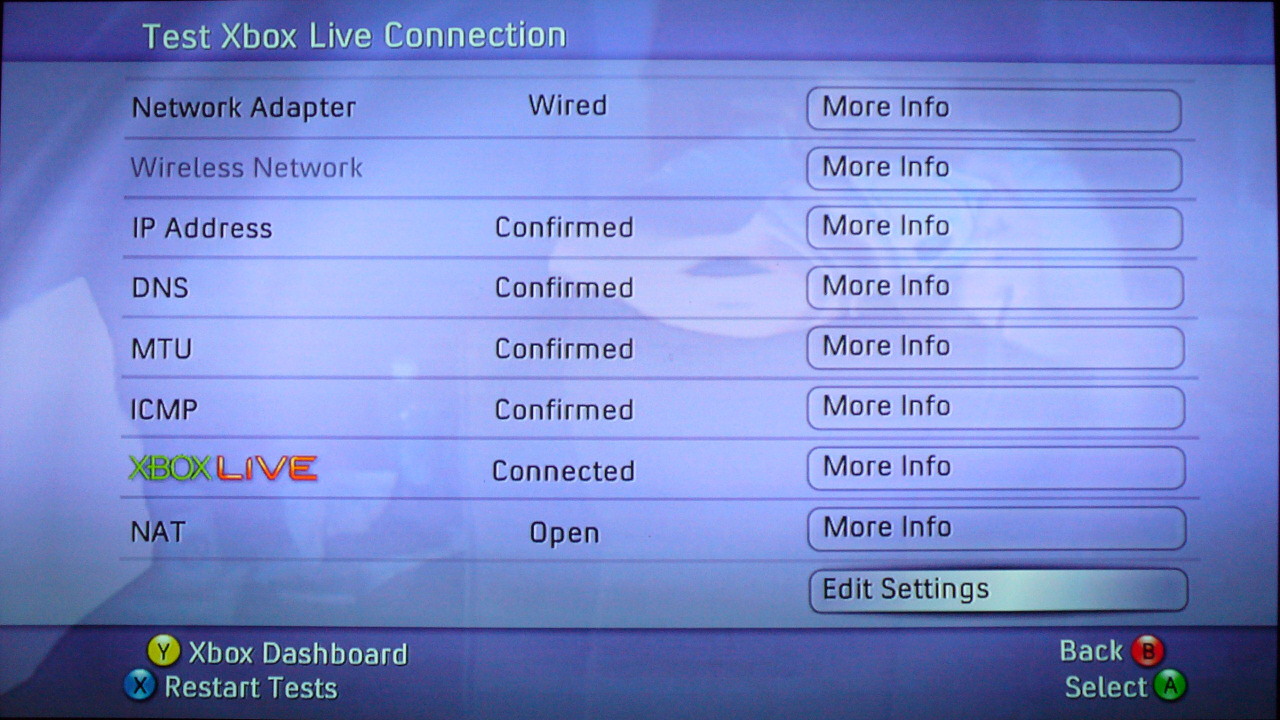
To find out if you're affected, turn on your Xbox 360 and load up the Dashboard. Navigate to the System blade, select Network Settings and test your Xbox Live Connection. Some of the steps can take a few seconds to complete. The results are meant to look like this:

IP Address: Confirmed
DNS: Confirmed
MTU: Confirmed
ICMP: Confirmed
Xbox Live: Connected
NAT: OPEN
The NAT item is especially important. If this says RESTRICTED or MODERATE instead of OPEN, you will need to configure your router and Xbox for online gaming. Tom McCann's website has easy to follow, illustrated instructions for D-Link and Linksys devices and walks you through all the steps on the Xbox. In addition to all that, Frosty had to disable the UPNP option to get everything working right. If you own a different brand router, the process should be very similar. You can also ask other Wingnuts for help on our Forums.

If your NAT is open you should have less trouble connecting to games. However, if another user in the game has a restricted NAT, you may not be able to connect all the same.
[KrisV] [# 8046] [Discuss]

--
Update published on 7/28/2007. View all news from that day.


News
Current News  
Report News  
FAQ/Contact Us  
News Archive  
On This Day  
RSS  
Search  
  

Universe
Background  
Document Archive  
WCPedia Project  
Encyclopedia  
Game Guides  
Ships Database  
Universe Maps  

Chat
Forums  
Conventions  
Newsgroups  
#WingNut  
ICQ  

Resources
Articles  
Cheats  
Files  
Music  
Holovids  
Wallpapers  
Tech Support  
Game Manuals  
Game Controls  
Where To Buy  

Projects
Fan Art  
Fan Projects  
Ship Models  
Fan Missions  
SO Ships  
InfoBurst  

Community
CIC Merchandise  
Xbox Live Tags  
Fan Directory  
Links  
Mail Bag  
Memorials  
Polls  
SETI@home  
Trivia  

Wing Commander on Sony PSP
Order
EA Replay

Prophecy GBA Cover
Order
Prophecy Advance

Wing Commander Movie DVD
Order
Wing Commander DVD