Banshee on the making

HammerHead

Rear Admiral
I'm trying to model a Banshee.

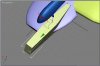
My main problem is creating a body (in this case a box) with round edges.
In the pictures I'm trying to model the forward gun pods.

Can anyone help me about which function sould I be looking for?
I'm using 3ds max, and I'm pretty green on this program.
 

Attachments

  • help1.jpg
    help1.jpg
    29.4 KB · Views: 135
  • help2.jpg
    help2.jpg
    32.1 KB · Views: 152
HammerHead said:
I'm trying to model a Banshee.

My main problem is creating a body (in this case a box) with round edges.
In the pictures I'm trying to model the forward gun pods.

Can anyone help me about which function sould I be looking for?
I'm using 3ds max, and I'm pretty green on this program.

take a look into modifiers roll out ;)
 
What you're looking for is Chamfer. go to edge select mode and select the edges you want to round off. Then find a tool called "Chamfer" usually in the edit geometry section of the Editable mesh modifier. click and drag until you get the rounding you want.

Howie
 
Howie knows his stuff, I don't use 3d max so I'm not much help. I use Cinema 4d, I'd probably use a sphere and modify to fit what I needed though...
 
Thanx Howie :)
your help is appriciated, though for some reason, I didn't get the result I wanted from "Chamfer".
In the meantime I applied a NURMS modifier of 1.0, so now it "looks like" it has round edges.
I need to play with the Chamfer a little more.

And now part 2!

Texturing: I'm currently planning on experimenting with UV maps (Academic exams can be a PAIN IN THE BUTT!)

any way, sould I use "Boolean" to bash my whole model into one object? or is it better to texture each part on its own? what about less importent part, texture wise I mean, like gun barrels?
 
Back
Top