Wing Commander Prophecy: Unlimited + HD Movie Support

Here is a sneak peek with some debug I added using the games own message system:
View attachment 8786

Well if no one else is going to say it, I will:

We're gonna need a bigger fighter.

All joking aside, I am loving what I am seeing between this unlimited patch and Defiance's MUP. I can't begin to touch your coding and programming abilities but seeing the tools and options you are making available to people like me is awe inspiring!
 
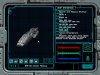
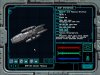
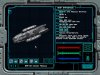
Heh. So because of @gr1mre4per evident fondness for all things BSG - I'm setting up a stress test for the WCP unlimited patch. I am going to use up every available turret slot (all 256 of them) to get a properly armed Cylon-war era Battlestar. I have the anti-ship KEWs properly turreted and placed (currently lamely set up with the antimatter guns - but I'm not going to mod in massive rail gun effects) and I'm currently placing all the anti-fighter turrets all along the hull. Technically there are I think around 250 all together but there are 24 main guns so I'll be short of the actual figure. These are twin barrel stormfire turrets with unlimited ammo. Once I get it all set up I'll snag some video on shadowplay and see how it handles it. Currently the Battlestar is 45K polys with the turrets, but that doesn't include all the anti-fighter emplacements so I'm guessing it'll end up north of 70K when all is said and done.

Columbia1.jpg Columbia2.jpg Columbia3.jpg

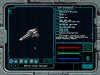
Although now that I have a certain new plaything I might need to take some time and practice getting proper collision trees set up. Oh and of course, what fun would this be without something fun to fly?

vipermk2_vision.jpg
 
That's quite an SAR shuttle you've got there ;). It's funny that while the Battlestar definitely has its own unique style, that fighter (whose name at the moment evades me) really just needs a Confed star to sit alongside a Ferret. Wouldn't look out of place at all. And that's not even mentioning the Razor...
 
That's quite an SAR shuttle you've got there ;). It's funny that while the Battlestar definitely has its own unique style, that fighter (whose name at the moment evades me) really just needs a Confed star to sit alongside a Ferret. Wouldn't look out of place at all. And that's not even mentioning the Razor...

I agree. I've always found that the Colonial Viper has some resemblance to both the Confed Ferret and the Rebel X-Wing. :)
 
I agree. I've always found that the Colonial Viper has some resemblance to both the Confed Ferret and the Rebel X-Wing. :)

Well there's perhaps a reason for that. Len Dykstra built the shooting models for both the X-wing and the original Colonial Viper. We know Wing Commander is heavily influenced by Star Wars, and I've always thought the Ferret was directly lifted from the Viper. So it all ties together.

in an interview Ronald Moore stated that he could reimagine most everything in the Galactica universe but he had to leave the Viper more or less alone as It's really a visual touchstone for the series. So that's kind of why you have a bit of a stylistic break between the Battlestar and the older Vipers.
 
in an interview Ronald Moore stated that he could reimagine most everything in the Galactica universe but he had to leave the Viper more or less alone as It's really a visual touchstone for the series. So that's kind of why you have a bit of a stylistic break between the Battlestar and the older Vipers.
Oh, I wouldn't say that. It's a bit of a fan superstition that everything should be the same style. Expecting the Battlestar and the Vipers in the same style is about as reasonable as the US Navy refusing the new F-35s because they don't stylistically fit with the carriers... :)

About the similarity with the Ferret, I honestly don't think there was that much - nowhere near comparable to the similarity with the Razor, in any case. For the Ferret, the similarities break down because of its diminutive size - as a ship, the Ferret is absolutely unique in that it actually seems smaller than most present-day, or even WWII fighters. And that narrow body, barely wide enough to accommodate the pilot - it's definitely very different. The similarities are more like family resemblances - far from identical, but clearly related.
 
Nice to see a bit of activity here. Nice work on the Galactica @DefianceIndustries, what makes you think I'm mad about bsg?? :) I can always increase the number of turrets if 256 isn't enough :)

Anyway, now I have (hopefully) got a working collision tree builder for @DefianceIndustries WCP:MUP, I managed to have another bash at Unlimited again. Squashed a bug from the original game that, pardon the pun, bugged me for ages:
  • Fixed bug where certain weapon types would impact the front shield/armour when shooting the rear (and vise versa) on Corvette style ships.
  • Implemented change to show hull impact instead of shield impact when Corvette shields are too low to absorb all damage from a weapon.
The above now gives you the impression that you are actually hitting the hull instead of the shields all the time.

Honestly I will get some more vids up soon, especially if I can get my own Galactica fully modified.
 
Well since the arrival of our baby boy, my 'office' has now become a bedroom and my PC has been mostly collecting dust in a corner somewhere. Now I have finally got around to getting a new desk for my new office (aka The Kitchen-Diner) I'll get my rig running and get back to work. Well, between changing nappies and watching Paw Patrol with my 2y daughter. I love that cartoon!

My next plan for wcpunl is to address an issue that is visible with MUP where the loading of high detailed ships mid-battle would cause a small pause to load the new detail. I've narrowed it down to the loading of the textures, rather than the loading of the mesh polygons. Prophecy tries to be efficient and doesn't load textures until the first time it is rendered. You can see this in the intro of MUP'd Ops when the two Excalibur's appear for the first time.

Fortunately there is a handy flag I can set that causes the textures to load when the mesh loads, rather than when the mesh is first rendered. All good, but Prophecy doesn't pre-load all mesh objects. If an object is statically placed in a mission, it is a PROP of the mission file and gets pre-loaded at the beginning of the mission. However, objects that are dynamically loaded (ships jumping in) are not a PROP and only get loaded as they jump in.

So my task is to pre-load everything at the start of a mission that is needed (or start of the game, if it doesn't chew up RAM too badly). I can already pre-load now and its working a treat, but I need to find a way of knowing what exactly to pre-load so I'm not blindly loading everything. Prophecy is very efficient in that it only loads each mesh object once and re-uses it for each ship in the game so I don't need to pre-load 20 morays or 10 Panthers. One of each will do the trick.

No job is too big, no pup is too small!
 
So I've updated the wcpunl.dll slightly and, subject to a successful quick test, should be included in the upcoming MUP release.

Update includes:
  • Pre-loading mesh materials
  • Pre-loading bitmaps
This update should stop most of the short pauses when loading the MUP's snazzy new HQ ships.

Oh, there is also another subtle (or not) update included that should keep you on your toes, more noticeable with AI ships: Manta, Devil Ray, Piranha, Shrike and Secret Ops Wasp. See if you notice...
 
If it is what I think, then some of the ships in the list are goign to turn from "difficult" to "challenging" and one being "challenging" is gonna turn "completely broken".
 
Ok so my plan was to put the 'subtle' change in for this MUP, and then make it configurable but off by default in the following MUP.

However in the interest of not wanting to upset those of a more purist persuasion, I have now made it configurable, default off for this MUP.

There are actually two new features added now in the upcoming release:
  • Quicker AI rate of fire. Noticeable with Stormfire and Dust Cannon. AI still conforms to weapon refire delay, it just tries to shoot quicker.
  • Turret refire delay uses bullet.iff instead of fixed 1s. Most turrets are already 1s delay anyway, but alien maser turret is 0.8s.
Currently to enable the functions, edit the wcpunl.cfg and add the following line:

ultraNightmare=1

Let the fun begin!
 
Phew, managed to get to page 3. Time for a bump!

Ok new version which is being reworked a little inside. I'm releasing it now mainly to solve crashes people are seeing but also for development of MUP.

Changes:
  • Fixed some incorrect offsets in Secret Ops CD, causing crashes when staring spaceflight
  • Replaced wcpunl.cfg with wcpunl.ini
  • Removed ultraNightmare
  • Added TurretRefireFromBulletIff default to 0
  • Added first test of 'Dead Caphips' modification for Secret Ops CD variant only
  • Added ability to load other developers' custom DLL's
Just replace the wcpunl.dll in your Secret Ops or Prophecy directory and you're set. Works on installs with MUP already installed. Will not work on vanilla installs.
 
Last edited:
Phew, managed to get to page 3. Time for a bump!

Ok new version which is being reworked a little inside. I'm releasing it now mainly to solve crashes people are seeing but also for development of MUP.

Changes:
  • Fixed some incorrect offsets in Secret Ops CD, causing crashes when staring spaceflight
  • Replaced wcpunl.cfg with wcpunl.ini
  • Removed ultraNightmare
  • Added TurretRefireFromBulletIff default to 0
  • Added first test of 'Dead Caphips' modification for Secret Ops CD variant only
  • Added ability to load other developers' custom DLL's
Just replace the wcpunl.dll in your Secret Ops or Prophecy directory and you're set. Works on installs with MUP already installed. Will not work on vanilla installs.

Thanks Grim, we'll add this version to the next MUP release
 
Time to blow the dust off this thread. Wow 2019 BC (before covid)...

I've seen a few threads recently of people having trouble getting HCl's DVD Movie patch working in more recent versions of Windows. I decided to install it to try get it working in hopes of providing some instruction to get it working, but I couldn't get it to work.

So...
### WCPUNL Beta 6.4
* Minor internal changes relating to subtitles.

### WCPUNL Beta 6.3
* Video processing moved into it's own thread to reduce stuttering at lower framerates.

### WCPUNL Beta 6.2
* Fixed video not working on Windows 10.
* IoEvent enumeration updated so movies exit correctly in all exit situations.
* Better handling of loading and decoding errors so the fall-back player will be used instead of a blank screen.
* Non square pixel aspect ratios correctly accounted for (VOB files are 704x480 at 10:11 aspect ratio = 640x480).
* Movies now play at their native resolution or the resolution specified by the GL, whichever is smallest. Previously always tried to match the GL settings.
* Subtitles decoupled from framerate, now uses movie sequence clock time.
* Corrected small error in subtitle font settings.
* Added De-interlacer for interlaced VOB files.
* Double frame rate for interlaced VOB files, blending of field 0 and field -1, as well as field 0 and field 1.
* Movie Player can be disabled via ini setting.
* Read Me updated with a section for description of all INI settings.
* New INI settings will appear in your wcpunl.ini after running the game for the first time after update.

Code:
### WCPUNL Beta 6.1
* Support for both CD and GoG installations using the prophecy.exe supplied in this package.
    A CD check is done, if no CD is found a local file check is performed.  If no local files found, Change CD screen will appear.

### WCPUNL Beta 6.0
* Fixed memory leak in the new Movie Player
* Turret barrel fire respects wcpunl.ini setting again
* File loading priority changed so directory has priority over tree file (no need to patch data.tre anymore)

### WCPUNL Beta 5.2
* Fixed spaceflight music not restarting after an in-flight cutscene (last mission).

### WCPUNL Beta 5.1
* ODVS's HD and original DVD movie support. Added to Prophecy only.
* Many thanks to Pedro for testing and updating the OpenGL to take full advantage.


### HD and DVD Requirements

Download ODVS's Prophecy HD Video Pack or the original DVD Movie
Pack from the www.wcnews.com Resources/Patches page and extract
into the 'movie' folder within WCP's root folder.

Ignore instructions to install the DVD Movie Upgrade Patch as
this seems to be having problems with more recent Windows
(hence this update).

ODVS's HD Video Pack:
        Seems to work straight away with no additional codec packs
        installed. Tested on a fresh install of Windows 11 N 25h2
        with Media Feature Pack added (required to play WCP and SO
        on N and KN versions).

DVD Movie Pack:
        1. Download and install MPEG2 free from the Microsoft
           store. https://apps.microsoft.com/detail/9N95Q1ZZPMH4
        2. Windows 11 24h2 and later fresh install, install the
           Windows Dolby Audio package. (included)

* No overlay window is created, no need to match resolutions.  Uses existing GL movie function.
* Movies will work in the original Software, Direct3d and 3Dfx Glide modes.
* Movies will work in the OpenGL 1.2 and earlier, not filling wide-screens.
* Movies will work in the OpenGL 1.3 and later, fills wide-screens.
* Gamma Correction, Show Movies and Subtitles in game options work.
* Even Interlaced Video will work in the original modes for a retro look!

Pedro has also asked I release the OpenGL 1.3 update at the same time. The new WCPUNL movie player will work with older versions of the GL, but the new version will allow the full screen FMVs to scale up to fit your screen, instead of sticking to the original 4:3, and take advantage of higher quality movies. Also some additional update are included...

*** This is just an update to the gl_00007.dll file. It is designed for existing installations of the MUP where the Open GL is already installed.

Code:
OpenGL Patch - v1.3

This patch is an additional optional graphics library (GL), compatible with both Prophecy and Secret Ops, and is ported from the release of Standoff Episode 5.

Originally designed to remove problems experienced when using Direct3D such as 32bit support for ATI cards, and removal of texture glitches.

The patch has since evolved into a specific visual style, featuring specular maps and slightly over-the-top bloom. This patch just screams 2000s, and I strongly recommend using it with both bloom and specular enabled. It supports hi-res, specular and iridescence overrides, as well as fairly dodgy implementation of bump mapping.

With Grim's help, the GL has been modified to support his HD movie playback in full screen. As Grim is creating his own GL, this is likely to be the last version of this one which relies heavily on outdated libraries. I appreciate his help creating this so that this particular look isn’t lost to history. I look forward to seeing the direction he takes with a modern implementation.

*** New in v1.3 ***

All modes:
Add support for Grim's movie playback (ODVS high-resolution DVD pack recommended: https://download.wcnews.com/files/wcp/wcp_hdpack_4.0.zip)
Decrease briefing line width on high-resolution monitors
Fix original FMV aspect on super-wide monitors
Fix pixel-based stars when starfield is disabled
Match 3DFX HUD transparency
Remove cockpit shake
Fix rendering of targets on the radar

With HDR Enabled:
Lens flares (were disabled for Standoff as it had super bright assets)
Make the briefing bloom less garish
Fix a bug with missile VDU which would cause the screen to flash

With HDR Disabled:
Ignore additive and superbright flags on overridden assets (balanced for HDR only)
Fix nav map rendering bug

This will still work alongside the wcphr.dll that contains other things amongst the original DVD patch, but the UNL completely bypasses the DVD Patch part.

Please give this a go and send me some feedback on how it works. I'll do my best to work out any issue found. Either PM me @grim3820 in Discord or reply back here. Thanks all.
 

Attachments

Last edited:
Back
Top