Wing Commander CIC
 

Hot Items

Java Chat in
#Wingnut Now!

  WC Saga Released
  Privateer on GOG!
  WC I & II on GOG!
  WC III on GOG!
  Standoff Episode 5
  Arena Manual PDF
  ASCII Privateer
  Flight Cmdr 1.5
  Homeworld Mod
  Standoff Scoreboard
  WCP Multiplayer
  WC3 Movie Project
  New Paper Models
  WC For Sony PSP
  Run Old Games
  Vista Compatibility
  Saga Prologue Out
  Prophecy DVD
  Priv 2 Cinematics
  DragonCon Gallery
  Play Armada Online
  Ten Years for WC4
  WC Turns 15
  Privateer 3 Script
  WC1 Blueprints
  Priv Online Site
  FanProject Roundup
  3dfx Glide Wrapper
  Trade WC CCGs
  Easy WC4 DVD
  Order CIC Gear
  Origin Closes Down
  Prophecy GBA

Hosting
  Flight Commander
  HCl's Editing Site
  Holding the Line
  Killerwave
  Paper Commander
  Popsicle Pete
  Priv Gemini Gold
  Standoff
  Task Force 16
  Unknown Enemy
  WC Zone
  WCSOM
  More Hosted Sites

Get Hosted!

Staff
  Contact Us
  Ben Lesnick
  Christopher Reid
  Barrie Almond
  Brandon Strevell
  Kris Vanhecke
  Aaron Dunbar
  Jason McHale
  Thanks

Links
  WC Arena
  Prophecy Advance
  Ascendant Pictures
  Raylight Studios
  Peter Telep
  William Forstchen
  Tom Wilson
  The Fat Man
  George Oldziey


2009.078 (March 19, 2009)[# 3452 | 3/19/2009] 

DOSBox Walkthrough: Remapping Joystick Buttons
Right now, DOSBox is the most popular solution for running classic Wing Commander games on modern hardware and operating systems. The PC emulator speed limits Wing Commander 1, allows Privateer and Armada to execute in Windows and adds support for USB joysticks and gamepads to the older games, among other things. The system will automatically assign functions such as main guns to one of the buttons on your controller, but it's also possible to customize this layout. Forums member Catnip has posted instructions for remapping functions such as afterburner or missile launch:
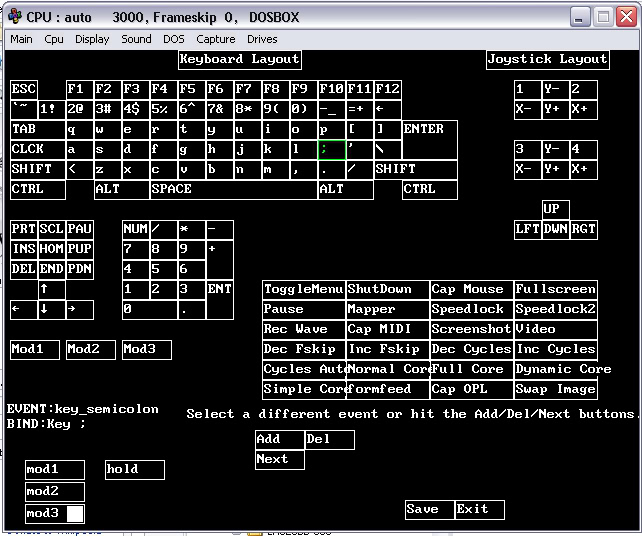
Yes, you could use an external program such as Xpadder or Pinnacle Game Profiler. They're very useful (though not perfect) for Wing Commander games you're not emulating, but for the DOS titles it might be better to use DOSBox's built-in mapper.

First of all, you need to make sure that buttonwrap is set to "false" in dosbox.conf (or your frontend, if your using one). Start the game and press CTRL + F1 to bring up the mapper. Tab is the keyboard command for afterburners in pretty much every Wing Commander game, so click on "Tab" on the on-screen keyboard, click "Add," then press the button on your controller you want to assign it to. That button will now trigger your afterburners. In this way you can assign the keyboard commands (check the manual or the CIC's controls page) for all the functions to the buttons of your choosing. When you're done, click "Save" to save the mapper file you've just set up, then click "Exit."

You may also want to click on "1" and "2" on the on-screen joystick layout in the upper-right corner and change those emulated buttons to different actual buttons. For example, DOSBox might assign button 1 (fire guns) to the triangle button on your controller, but you want button 1 to be the square button instead. In this case you would click on button 1 on-screen, click "Del" to delete its current mapping, then click "Add" and press the button you want to assign it to.

Or you could just delete button 1 or 2 and not assign them to anything. If you don't like Wing Commander's system of pressing both buttons to fire a missile, you could delete button 2 and assign the Enter key (which also fires missiles) to a button.

DOSBox is up to version 0.72. We have detailed walkthroughs for all DOS titles in our Tech Support section.
[KrisV] [# 9335] [Show comments]

Making the Game: Mission E4b
E4b is the losing alternative to the T'lan Meth 4a strike -- a sad mission, in comparison. Whoever wrote these mission notes, though, sure loved using 'hose' as a verb; I count eight uses...

These updates are thanks to John "Captain Johnny" Guentzel, who provided several CD image archives of material used by the Wing Commander Prophecy development team!

Mission E4b
Download (82 kb)

Date: November 25, 1997
Project: Wing Commander Prophecy
Donated By: John Guentzel
Pages: 8


[LOAF] [# 9326] [Show comments]

News
Current News  
Report News  
Twitter Feed  
Facebook Page  
FAQ/Contact Us  
News Archive  
On This Day  
RSS  
Search  


Universe
Background  
Document Archive  
WCPedia Project  
Encyclopedia  
Game Guides  
Ships Database  
Universe Maps  

Chat
Forums  
Conventions  
Newsgroups  
#WingNut  
ICQ  

Resources
Articles  
Cheats  
Files  
Music  
Holovids  
Wallpapers  
Tech Support  
Game Manuals  
Game Controls  
Where To Buy  

Projects
Fan Art  
Fan Projects  
Ship Models  
Fan Missions  
SO Ships  
InfoBurst  

Community
CIC Merchandise  
Xbox Live Tags  
Fan Directory  
Links  
Mail Bag  
Memorials  
Polls  
SETI@home  
Trivia  

Academy on DVD
Pre-order
Academy DVD

Academy on DVD
Pre-order
Academy DVD
(Canada)

Wing Commander on Sony PSP
Order
EA Replay

Prophecy GBA Cover
Order
Prophecy Advance

Wing Commander Movie DVD
Order
Wing Commander DVD